Les échelles de mots de Lewis Carroll, une application de GraphSearch et du problème de l'arbre de Steiner
Source: chapitre 33 de « Selected Papers on Fun and Games » de Donald E. Knuth.
Une échelle de mots est un jeu qui consiste à trouver, connaissant un mot de départ et un mot d’arrivée une succession de mots tel que le mot \(i+1\) est semblable au mot \(i\) (au sens où une transformation simple suffit à passer du mot \(i\) au mot \(i+1\)).
Nous allons considerer une version simplifiée du jeu qui n’autorise que l’opération de changement d’une lettre sur les mots (on ignore les opérations « ajout / retrait de lettre » et « changement de l’ordre des lettre »).
…Quelques problèmes en Answer Set Programming
Cette page rassemble quelques solutions en Answer Set Programming (avec Clingo) à une sélection de problèmes de logique originaires de sources diverses et variées.
Brilliant Order logic
Source: https://brilliant.org
Qu°1
- 4 is before 1 and 2.
- 3 is after 1 and 2.
- 2 is before 1.
#const n=4.

values(1..n).
before(4, (1;2)).
after(3, (1;2)).
before(2, 1).


values(1..n).

after(After, Before) :- before(Before, After).
before(Before, After) :- after(After, Before).

n { position(Value, Position): values(Value), values(Position) } n.

:- position(Value, Position1), position(Value, Position2) , Position1 != Position2.
:- position(Value1, Position), position(Value2, Position) , Value1 != Value2.


Position1 < Position2 :- before(Value1, Value2) , position(Value1, Position1), position(Value2, Position2).

#show position/2.
4,2,1,3
…Le problème de couverture par sommets en Answer Set Programming avec Clingo
Dans le précédent poste, nous avions résolu le problème de la couverture minimale avec l’Integer Programming. Dans ce billet, nous poursuivons notre exploration de ce problème en implémentant un programme logique Answer Set Programming avec clingo.
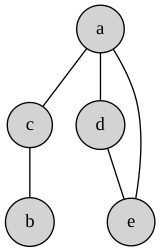
Reprenons le meme exemple:
% On commence par définir le graphe non orienté
% L'ensemble des sommets
noeud(a;b;c;d;e).
% L'ensemble des aretes
arete(a,c).
arete(a,d).
arete(a,e).
arete(c,b).
arete(d,e).

% Comme le graphe est non orienté, dès lors qu'une arete u,v existe, l'arete v,u est prise en compte.
arete(U,V) :- arete(V,U).

% Ici commence les choses intéressantes:

% Définition d'une couverture valide
:- couverture(V), - noeud(V).
% la couverture est un sous-ensemble des sommets

1 { couverture(U); couverture(V) } 2 :-
  arete(U, V).

cardinal(N) :- #count { V: couverture(V) } = N.
#minimize { N: cardinal(N) }.
#show couverture/1.
clingo version 5.8.0
Reading from /tmp/babel-lLz0Yh/clingo-zvg3tr
Solving...
Answer: 1 (Time: 0.001s)
couverture(c) couverture(d) couverture(e)
Optimization: 3
OPTIMUM FOUND

Models       : 1
  Optimum    : yes
Optimization : 3
Calls        : 1
Time         : 0.001s (Solving: 0.00s 1st Model: 0.00s Unsat: 0.00s)
CPU Time     : 0.001s
Ce qui donne, en jaune sur le graphe ci-dessous, la couverture minimale:
…Le problème de couverture par sommets en Integer Linear Programming avec LP-solve
Le problème de couverture par sommets (ou Vertex Cover en anglais) consiste, étant donné un graphe, à trouver un ensemble minimum de sommets de sorte que toutes les arêtes soient couvertes.
Formellement: soit \(G(V, E)\) un graphe, une couverture est un ensemble \(S\) tel que: \[ S \subseteq V \text{ tel que } \forall e = (u, v) \in E, u \in S, \text{ ou } v \in S \]
L’objectif est de miniser la taille de \(S\).
…Analyser des sons pour le programme Vigie-Chiro sur votre machine GNU/Linux avec Wine
Après avoir enregistré des sons de chauve-souris, orthoptères ou d’oiseaux, il est souvent utile de jeter un oeil aux spectrogrammes des enregistrements, par exemple lors de l’analyse d’enregistrements réalisés dans le cadre du programme Vigie-Chiro.
Les logiciels recommandés dans les tutoriels Vigie-Chiro sont, pour certains, développés uniquement pour Windows. Dans cet article, nous apprendrons comment installer ces logiciels (Kaleidoscope, Syrinx, Batsound 4, 7-zip et Lupas-Rename) sur une machine Linux à l’aide de Wine.
…